





Tech Untangled: Create an Excel from a PDF
-1.jpg)
 Create an Excel from a PDF
Have you ever had a pdf that consisted of a table with a list that you wanted to be able to edit? If it was a Word document, you could just open it in Word and it would convert it. Unfortunately, it doesn't work that way in Excel. However, you can insert a pdf once you're inside Excel which will then convert the contents into a table. Follow the directions below to do this:
1. Open Excel
2. Go to "Data" top tab -> "Get Data" from the ribbon -> From File -> From PDF
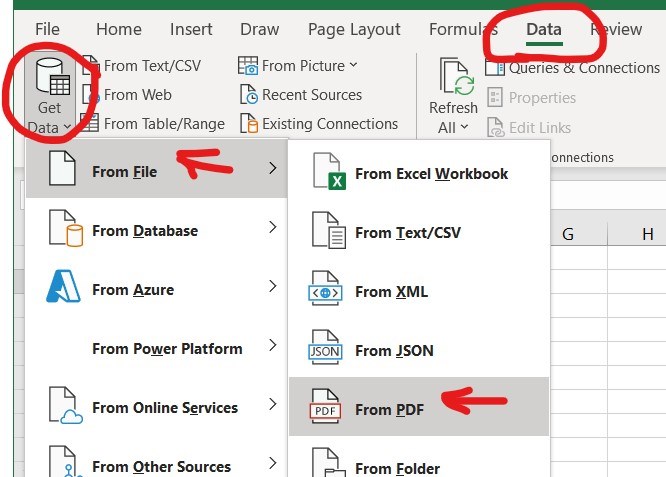
3. Locate the PDF from your computer -> Import.
4. Depending on the file you chose, select "Table" -> "Load" (NOT transform data).
The data will be imported AND automatically converted to a table. This will allow you to use the drop-down arrows at the top of each column to easily manipulate your data.

 Google Translate